Techknow_Study

Archive for the category “Computer World”

Basic Parsing

Basic Parsing

  •  What do you understand by parsing?
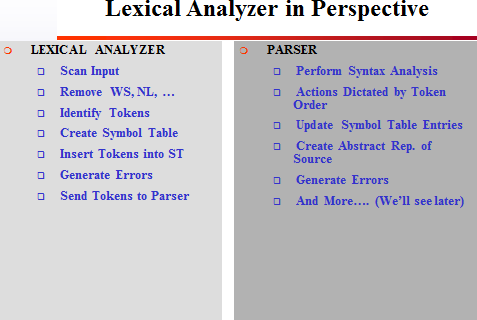
Parsing (also known as syntax analysis) can be defined as a process of scanning/analyzing a text which is collection tokens that are symbols, and then give it a grammatical structure
with respect to a given grammar.

On the bases, how the parse tree is built, Parsing techniques are further divide into three general categories, that are, universal parsing, top-down parsing, and bottom-up parsing. But the most commonly used parsing techniques are top-down parsing and bottom-up parsing. The first one “Universal parsing” is not used as it is not an efficient technique.

  • The role of a parser?
Role of a parser:In computer technology, a parser is a program, usually part of a compiler, that receives input in the form of sequential program/collection.

or

A parser receives a string of tokens from lexical analyzer and constructs a parse tree if the string of tokens can be generated by the grammar of the source language; otherwise, it reports the syntax errors present in the source string.

>>>>>>>>>>

3-tier-architecture

3-tier-architecture

Hello Guys,

Here I am giving you a brief intro about 3-tier architecture.
3-tier-architecture is the most important part of building any application, the way you build your application decide the flexibility and reliability of it. The powerful structure of the application helps users as well as developers in an efficient way.
Let’s have a look first what a 3-tier architecture is and how it works :


There are three main layers in this architecture.
(1) Presentation Layer
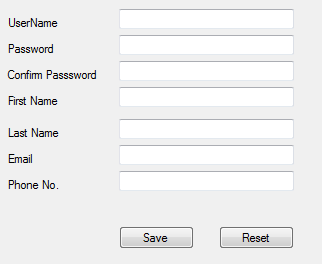
Presentation layer contains UI part of our application i.e., our aspx pages or input is taken from the user. This layer mainly used for design purpose and get or set the data back and forth. Here I have designed my registration aspx page like this


(2) Business Layer
This layer contains the main logic of your application. Like contains our business logic, calculations related with the data like insert data, retrieve data and validating the data.
This acts as an interface between presentation layer and Data Access Layer

Here all the classes, properties, constructors and methods are implemented. This layer gets the data from presentation layer and pass it to the data access layer to perform actions on database. Data Access layer hence, returns the value to the business layer and it again pass this value to the presentation layer. So business layer is the bridge between presentation and data access layers.
(3) Data Access Layer
This layer is only authorized(desirably) to make operations on database and perform CRUD (Create,Read,Update and Delete) queries on the database. It will run stored procedures and return data processed by them and pass it back to the business layer.
IT MEANS:-
3-tier application architecture provides a model for developers to create a flexible and reusable application. By Breaking up an application into different Modules/Tier, developers only have to modify or add a specific layer, rather than have to rewrite the entire application over. For example, if you want to add a new field “mobile” to the user table in database, you will have to change the code each and every place where you required to get this field, update this field or insert value into this field. But if you have implemented a 3-tier architecture, you can just add a new property to the user class and that’s it!!
Since the business logic is separated from the data access layer, changing the data access layer won’t affect the business logic much. Let’s say if we are moving from SQL Server data storage to Oracle there shouldn’t be any changes required in the business layer component and in the presentation layer. We would only make the changes to data access layer and that’s it, again!!
So, from the developer’s view, the application built using tired architecture is efficient and well manageable.
……………………..

Lexical Analysis

Lexical Analysis

Overview

_ Main task: to read input characters and group them into
tokens.”

_ Secondary tasks:

_ Skip comments and whitespace;
_ Correlate error messages with source program (e.g., line number of error).


Lexical Analysis: Terminology

_ token: a name for a set of input strings with related
structure.

Example: “identifier,” “integer constant”

_ pattern: a rule describing the set of strings
associated with a token.

Example: “a letter followed by zero or more letters, digits, or
underscores.”

_ lexeme: the actual input string that matches a
pattern.
Example: count

Examples

Input: count = 123
Tokens:
identifier : Rule: letter followed by …”
Lexeme: count
assg_op : Rule: =
Lexeme: =
integer_const : Rule: digit followed by …”
Lexeme: 123

Attributes for Tokens

_ If more than one lexeme can match the pattern for a
token, the scanner must indicate the actual lexeme
that matched.

_
This information is given using an attribute
associated with the token.

comparison between Compiler and Interpreter

What are the differences between Compiler and Interpreter?

=>   In the field of computers, the instructions given by the user are normally of high level language, whereas the computer will understand the instructions only in the binary format, the language of a computer is known as machine language. The sole purpose of the compiler and interpreter is to convert the user given high level language into machine level language so as to make the computer understand and executed the users driven instruction set. “If both the interpreter and compiler are used for sole purpose then what is the significance of each, for this reason the current report if aimed at exploring the difference between a compiler and interpreter”. A compiler will translate the high level language input given by the user into the machine language, i.e. in the binary codes, whereas an interpreter also converts the high-level language into machine level language but the interpreter will initially generate an intermediate code and then convert the high level language to machine level language.

The following context doles out brief description on the differences among the compiler and interpreter

Difference between compiler and interpreter:


Even though the compiler and interpreter are used for converting the high level language to machine language, there exist few variations between the compiler in the style and functionalities in converting the languages.
Compiler is a unique program that runs the instructions that are written in a certain programming language and convert them into the machine code that a computer can understand. The interpreter just does the same work as of the compiler, but the major variation is that, it converts the high level language into an intermediate code which is executed by the processor.  Normally a developer compose the instructions set by using any kind of programming language such as C, Java, Pascal, Python etc. The instruction written by the programmer is referred as the source code. The programmer must initiate the compiler or interpreter that is pertained to the language used for writing source code. Interpreter investigates and runs each line of source code in sequence, without considering the whole program at once. Nevertheless, programs shaped by compilers run greatly faster than the same instructions executed by an interpreter.
Basic differences between Compiler and Interpreter:
  • Compiler translates the high level instruction into machine language, but the interpreter translates the high level instruction into an intermediate code.
  • The compiler executes the entire program at a time, but the interpreter executes each and every line individually.
  • Compiler reports the list of errors that are caused during the process of execution, but the interpreter quits translating soon after finding an error, the progression of the other lines of the program will be done after refining the error.
  • Autonomous executable file is generated by the compiler while interpreter is compulsory for an interpreter program.
Differences on the basis of Various characteristics:
  • In a compiler the analyzing and processing time of the program is more, while an interpreter spends less time for the program analyzing and processing.
  • The resulting code of the compiler is in the form of machine code or binary format, in case of interpreter the resulting code is in the form of the intermediate code.
  • In case of compiler, the resulting code is executed by the computer hardware, in an interpreter; another program interprets the resulting code.
  • The execution of the program is fast in the compiler; in an interpreter the program execution speed is comparatively slow.
Differences on the basis of programming:
  • The compiler will verify syntax of program, whereas the interpreter verifies the keywords of a program.
  • The compiler will verify the entire program at a time, but the interpreter verifies the program concurrently in the editor.
  • The execution of the program in the interpreter is done line by line but the compiler executes the program on the whole.

USB 2.0


USB 2.0

Both the FireWire and the USB allow you to easily install external peripherals to the computer, such as digital cameras, keyboards, mouse, printers, Zip-drives, CD recorders, hard disks etc, through a standardized connector available in the computer’s motherboard (in the case of USB) or through an extra board added to the computer (in the case of the FireWire, if you don’t have a high-end motherboard with this kind of bus).
FireWire (also known as IEEE 1394) is an external bus to connect external peripherals to the computer, similar to USB, which has as great attractive a high transfer rate: 400 Mbps (that is approximately 50 MB/s).
The USB Implementers Forum (http://www.usb.org), that is the group of manufacturers that developed the USB, has already developed the USB second version, called USB 2.0 or High-speed USB. This new USB version has a maximum transfer rate of 480 Mbps (approximately 60 MB/s), that is, a higher rate than the FireWire and much higher than its previous version (called 1.1), that is the version we have today in our computers and that allows the connection of peripherals using transfer rates of 12 Mbps (approximately 1.5 MB/s) or 1.5 Mbps (approximately 192 KB/s), depending on the peripheral.

The great problem of the USB was its transfer rate. Just remember that most hard disks available nowadays on the market work at a rate of 66 MB/s. As the USB used at present only transfers 1,5 MB/s, an external hard disk connected to the computer through USB is extremely slow. For more common applications – such as printers, scanners and video cameras – the USB transfer rate is satisfactory. The real problem is the connection of peripherals that demand high transfer rates, basically data storage systems, such as hard disks, CD recorders and Zip-drives.
The USB 2.0 port continues 100% compatible to USB 1.1 peripherals. When initializing the communication with a peripheral, the port tries to communicate at 480 Mbps. If it does not succeed, it lowers its speed to 12 Mbps. If the communication is still not established, the speed is then lowered to 1,5 Mbps. So, the users should not worry about the USB peripherals that they already have: they will continue being compatible to the new pattern.
A very important detail is that USB 1.1 hubs cannot establish connections at 480 Mbps to peripherals connected to them. For example, if you have a USB 1.1 keyboard which has a built-in USB 1.1 hub, USB 2.0 peripherals connected to this keyboard will only get to communicate with the computer at 12 Mbps tops, and not at 480 Mbps. So, you should pay close attention to this detail.
The great advantage of the USB 2.0 over the FireWire is, therefore, the compatibility with the already existing USB peripherals. We also remind you that the FireWire has been basically designed to the audio and video market, which allowed video cameras and new professional audio and video equipment to be connected to the computer at a much lower cost than the usual necessary hardware for this kind of connection. We can say, therefore, that the USB and FireWire target market is, in a certain way, different. Only now the USB will be able to compete on this market, with its 2.0 version, and it may take a long time until we have audio and video equipment with USB connectors.

Serial


Why Serial?

If you pay attention to it, all technologies that exist today are migrating from parallel communication to serial communication.  The new IDE standard for hard disks is serial (ATA Serial).  The PCI bus will be transformed into serial in the years to come, with the release of its new version, the PCI Express.  The SCSI interface is also being transformed into serial.

The serial communication differs from the parallel one for only transmitting a bit at a time, while in the parallel communication several bits are transmitted per time.  That makes the parallel communication faster than the serial one.
That statement, however accepted by most people, is not totally true.  The serial communication may be faster than the parallel one, all you need is that the bits leave the transmitting device at a much higher speed.  An example of such is the ATA Serial port that however serial can reach a transfer rate of up to 150 MB/s, while the traditional IDE port gets to reach 133 MB/s at the most.
There are several reasons to make the devices migrate from the parallel communication to the serial one.  In the parallel communication, since several bits are transmitted per time, a wire is required per each bit.  For instance, in a 32 bit communication (as it is the case of the PCI slot) 32 wires are required just for the data transmission, not to mention the additional control signals that are necessary.  The higher the quantity of bits being transmitted per time, the more wires are used, making the creation of cables and the construction of boards difficult. In the serial communication, only two wires are required, making it much easier to project the communication between two devices.
The higher the transfer rate, the bigger the problem with the electromagnetic interference.  Each wire becomes an antenna in potential, capturing a lot of noise from the environment, which may corrupt the data transmitted.  In the parallel communication, since many wires are used, the problem of the electromagnetic interference is a serious one.  In the serial communication, on the other hand, since only two wires are used, that problem is much more easily solved, by simply protecting the two wires used.
There is yet another problem, a not much discussed one.  Even though we say that in the parallel communication all the bits are transmitted at the same time, the bits do not get to the receiver exactly at the same time.  If in low performance devices the small time difference in the reception of the several bits of data is not important, in high-speed devices that difference in the reception time of the several bits makes the device wastes time having to wait for all the bits to arrive, which may represent a significant fall in performance, since the data transmission operation happens in very short times.
Another difference between the parallel communication and the serial one is that the parallel communication is half-duplex, while the serial one is full-duplex.  In plain English, that means simply the following:  in the parallel communication, the only path between the transmitter and the receiver is used both for the transmission and for the reception of the data.  Since there is only one path, it is not possible to transmit and receive data at the same time.  In the serial communication, on the other hand, since it only uses two wires, the manufacturers usually make four wires available, two for the transmission and two for the reception of data.  In other words, a path just for the transmission of data, and another one only for its reception. That makes it possible for the simultaneous transmission and reception of data. Such architectural difference alone makes the serial communication potentially twice as fast as the parallel communication, if we compare two communications that have the same transfer rate.

Registry tool

                 Registry tool

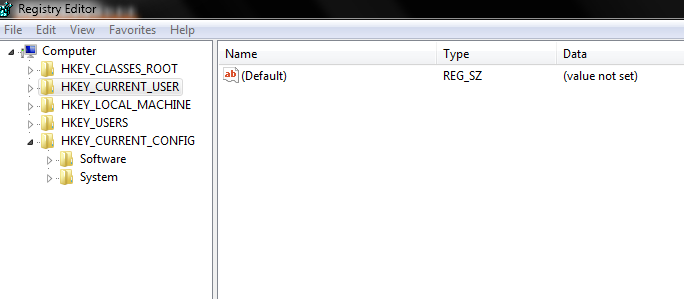
=> You can modify the registry to change the location of special folders like

  • My Documents
  • Favorites
  • My Pictures
  • Personal

  1. Start Regedit
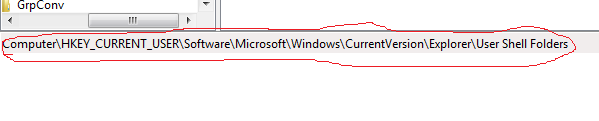
  2. Go to HKEY_CURRENT_USER\Software\Microsoft\Windows\CurrentVersion \Explorer\User Shell Folders

  3. Double click on any locations you want to change and alter the path
  4. Logoff or restart for the changes to go into effect

PATCH AND KEYGEN

HOW TO FIND CRACK,PATCH AND KEYGEN FOR ALL SOFTWARE

HELLO GUYZ I AM WITH NICE AND AWES0ME TRICKS TODAY:

1) GO TO GOOGLE.COM

2)THEN IN THE SEARCH BOX TYPE THE SOFTWARE NAME 94fbr

3) SEE THE PICTURE BELOW IF U DONT UNDERSTAND:


TCP vs UDP

TCP VS UDP

TCP
UDP
Acronym for:
Transmission Control Protocol
User Datagram Protocol or Universal Datagram Protocol
Function:
As a message makes its way across the internet from one computer to another. This is connection based.
UDP is also a protocol used in message transport or transfer. This is not connection based which means that one program can send a load of packets to another and that would be the end of the relationship.
Usage:
TCP is used in case of non-time critical applications.
UDP is used for games or applications that require fast transmission of data. UDP’s stateless nature is also useful for servers that answer small queries from huge numbers of clients.
Examples:
HTTP, HTTPs, FTP, SMTP Telnet etc…
DNS, DHCP, TFTP, SNMP, RIP, VOIP etc…
Ordering of data packets:
TCP rearranges data packets in the order specified.
UDP has no inherent order as all packets are independent of each other. If ordering is required, it has to be managed by the application layer.
Speed of transfer:
The speed for TCP is slower than UDP.
UDP is faster because there is no error-checking for packets.
Reliability:
There is absolute guarantee that the data transferred remains intact and arrives in the same order in which it was sent.
There is no guarantee that the messages or packets sent would reach at all.
Header Size:
TCP header size is 20 bytes
UDP Header size is 8 bytes.
Common Header Fields:
Source port, Destination port, Check Sum
Streaming of data:
Data is read as a byte stream, no distinguishing indications are transmitted to signal message (segment) boundaries.
Packets are sent individually and are checked for integrity only if they arrive. Packets have definite boundaries which are honored upon receipt, meaning a read operation at the receiver socket will yield an entire message as it was originally sent.
Weight:
TCP requires three packets to set up a socket connection, before any user data can be sent. TCP handles reliability and congestion control.
UDP is lightweight. There is no ordering of messages, no tracking connections, etc. It is a small transport layer designed on top of IP.
Data Flow Control:
TCP does Flow Control. TCP requires three packets to set up a socket connection, before any user data can be sent. TCP handles reliability and congestion control.
UDP does not have an option for flow control
Error Checking:
TCP does error checking
UDP does error checking, but no recovery options.
Fields:
1. Sequence Number, 2. AcK number, 3. Data offset, 4. Reserved, 5. Control bit, 6. Window, 7. Urgent Pointer 8. Options, 9. Padding, 10. Check Sum, 11. Source port, 12. Destination port
1. Length, 2. Source port, 3. Destination port, 4. Check Sum

UDP

OSI Reference Model for Network Protocols

==>>

OSI is a model that is used to understand how network protocols work. Usually when we are studying how networks work this is one of the first topics on the study guide. The problem, however, is that usually people don’t understand why this model exists nor how it really works – even people that memorized the names of all the seven layers of this model to take an exam at college or a certification exam still have no clue. In this tutorial we will explain you why the OSI model exists and how it works and we will also present a quick correlation between TCP/IP and the OSI model.
When computer networks first appeared many years ago they usually used proprietary solutions, i.e., only one company manufactured all technologies used by the network, so this manufacturer was in charge of all systems present on the network. There is no option to use equipments from different vendors. 
In order to help the interconnection of different networks, ISO (International Standards Organization) developed a reference model called OSI (Open Systems Interconnection) in order to allow manufacturers to create protocols using this model. Some people get confused with these two acronyms, as they use the same letters. ISO is the name of the organization, while OSI is the name of the reference model for developing protocols.
Protocol is a ”language“ used to transmit data over a network. In order to two computers talk to each other, they must be using the same protocol (i.e., language).
When you send an e-mail from your computer, your e-mail program (called e-mail client) sends data (your e-mail) to the protocol stack, which does a lot of things we will be explaining in this tutorial, then this protocol stack sends data to the networking media (usually cable or air, on wireless networks) then the protocol stack on the computer on the other side (the e-mail server) gets the data do some processing we will explain later and sends data (your e-mail) to the e-mail server program.
The protocol stack does a lot of things and the role of the OSI model is to standardize the order under which the protocol stack does these things. Two different protocols may be incompatible but if they follow the OSI model, both will do things on the same order, making it easier to software developers to understand how they work.
You may have notice that we used the word ”stack“. This is because protocols like TCP/IP aren’t really a single protocol, but several protocols working together. So the most appropriate name for it isn’t simple ”protocol“ but ”protocol stack“.
The OSI model is divided into seven layers. It is very interesting to note that TCP/IP (probably the most used network protocol nowadays) and other ”famous“ protocols like IPX/SPX (used by Novell Netware) and NetBEUI (used by Microsoft products) don’t fully follow this model, corresponding only to part of the OSI model. On the other hand, by studying the OSI model you will understand how protocols work in a general fashion, meaning that it will be easier for you to understand how real-world protocols like TCP/IP work.
The basic idea of the OSI reference model is this: each layer is in charge of some kind of processing and each layer only talks to the layers immediately below and above it. For example, the sixth layer will only talk to the seventh and fifth layers, and never directly with the first layer.
When your computer is transmitting data to the network, one given layer will receive data from the layer above, process what it is receiving, add some control information to the data that this particular layer is in charge of, and sending the new data with this new control information added to the layer below.
When your computer is receiving data, the contrary process will occur one given layer will receive data from the layer below, process what it is receiving, removing control information from the data that this particular layer is in charge of, and sending the new data without the control information to the layer above.
What is important to keep in mind is that each layer will add (when your computer is sending data) or remove (when your computer is receiving data) control information that it is in charge of.

Post Navigation

Design a site like this with WordPress.com
Get started